Two things every Claude Pro user needs and does not currently have
This article covers two things. First, how to recognize when your context window is getting full, meaning the conversation is growing and Claude's ability to see the whole thing is shrinking, even though nothing on screen tells you that directly. Second, how to move to a new chat without losing what you already built.
Every so often, Claude will tell you that you are out of usage, and you are locked out for up to five hours. For most people this is rare. It helps to know where to check where you stand. Click Settings, then Usage, and you will see your rolling five hour and weekly usage as a percentage.
There Is No Way to See How Full a Conversation Is
Claude.ai gives you no live gauge, no token counter, nothing that shows you how full your current conversation actually is. Long conversations do not hit a wall and stop. They are managed on a rolling basis, so once a conversation gets long enough, the earliest parts quietly fall out of what Claude can actually use, even though they are still sitting on your screen. You keep typing. Claude keeps answering. You have no way of knowing, in the moment, that your early instructions are no longer in view.
There Is Sort of a Usage Meter
That Settings, then Usage page is genuinely useful, and credit is due for that. It does one thing well: it can warn you that you are getting close to being cut off for usage. That is really what it is built to tell you. What it will not tell you is how full this specific conversation is. You could be sitting comfortably on that page and still be deep inside a chat that has quietly dropped half of what you said an hour ago. It is a different number, measuring a different thing. It should be better, honestly, but that is what we have for now.
Three Signals, From Worst to Best
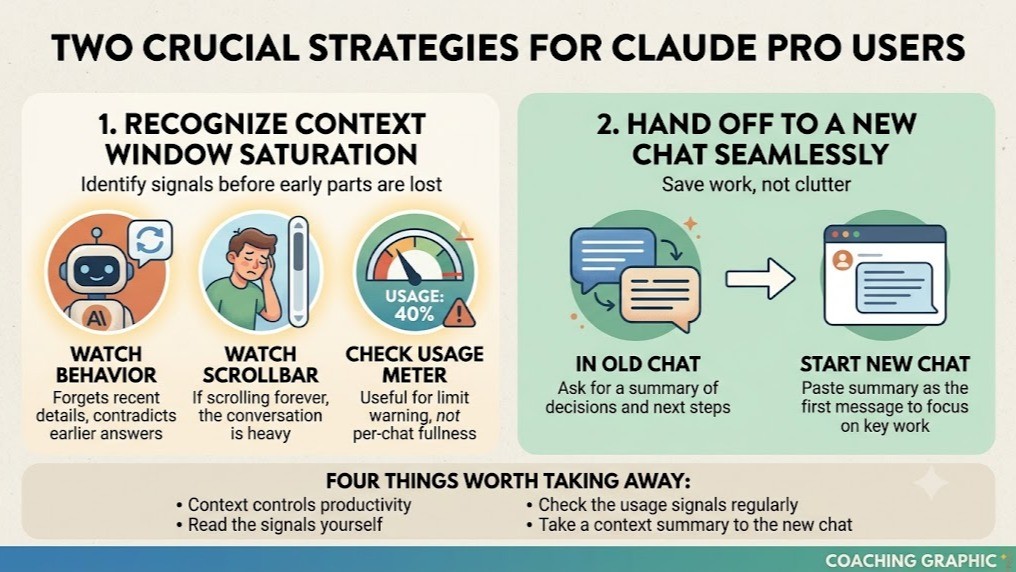
The Usage page can warn you before you get cut off, but it is easy to forget to check, and it will not tell you how full a single conversation is.
Claude's behavior is the next signal. It starts repeating itself, forgetting what you said a few minutes ago, or contradicting an earlier answer. This is accurate, but the damage is often partly done by the time you notice it.
The scrollbar is the crudest signal, but it is free and it is always in front of you. If you have to scroll forever to reach the top of a chat, that conversation is heavy, and Claude is re-reading all of it on every message you send.
Two screenshots, taken about fifteen minutes apart, in two different conversations, tell the story. Sorry about the ugly screenshots
Tiny Bar = bad! big bar = just starting
This Actually Matters
A bloated, hours-long conversation costs more per message than a short, focused one, even with identical prompts. Run that pattern all day and you can hit your limit well before you expected to, right in the middle of the thing you needed to finish. Watch the conversation for the real warning signs, not the usage page, and you can usually avoid it.
How to Actually Hand Off to a New Chat
Starting a new chat only works if you do not lose what mattered in the old one. Saying, look at the previous chat, in the new one mostly does not work. It pulls in everything, including the clutter you were trying to escape.
What works is asking the old chat to build its own handoff before you leave it. Ask Claude directly: write a summary for a new chat covering what we decided, what is still open, and what comes next. That forces Claude to compress the conversation to what actually matters, in its own words, while it can still see the whole thing. Paste that summary as the first message in the new chat. You lose the clutter, not the work.
Four Things Worth Taking Away
Context window size genuinely controls your productivity on Claude, whether you realize it or not.
There is a way to read the signals yourself right now, today, without installing anything: watch behavior, watch the scrollbar, and treat the usage page for what it actually measures.
Anthropic does not currently give users a real, native way to see how full their own conversation is. Given how directly this affects productivity, that gap is worth fixing.
Anthropic is building genuinely excellent technology. A simple, visible, per conversation context indicator would be a giant leap toward taking care of the users who make that technology worth building.